Background
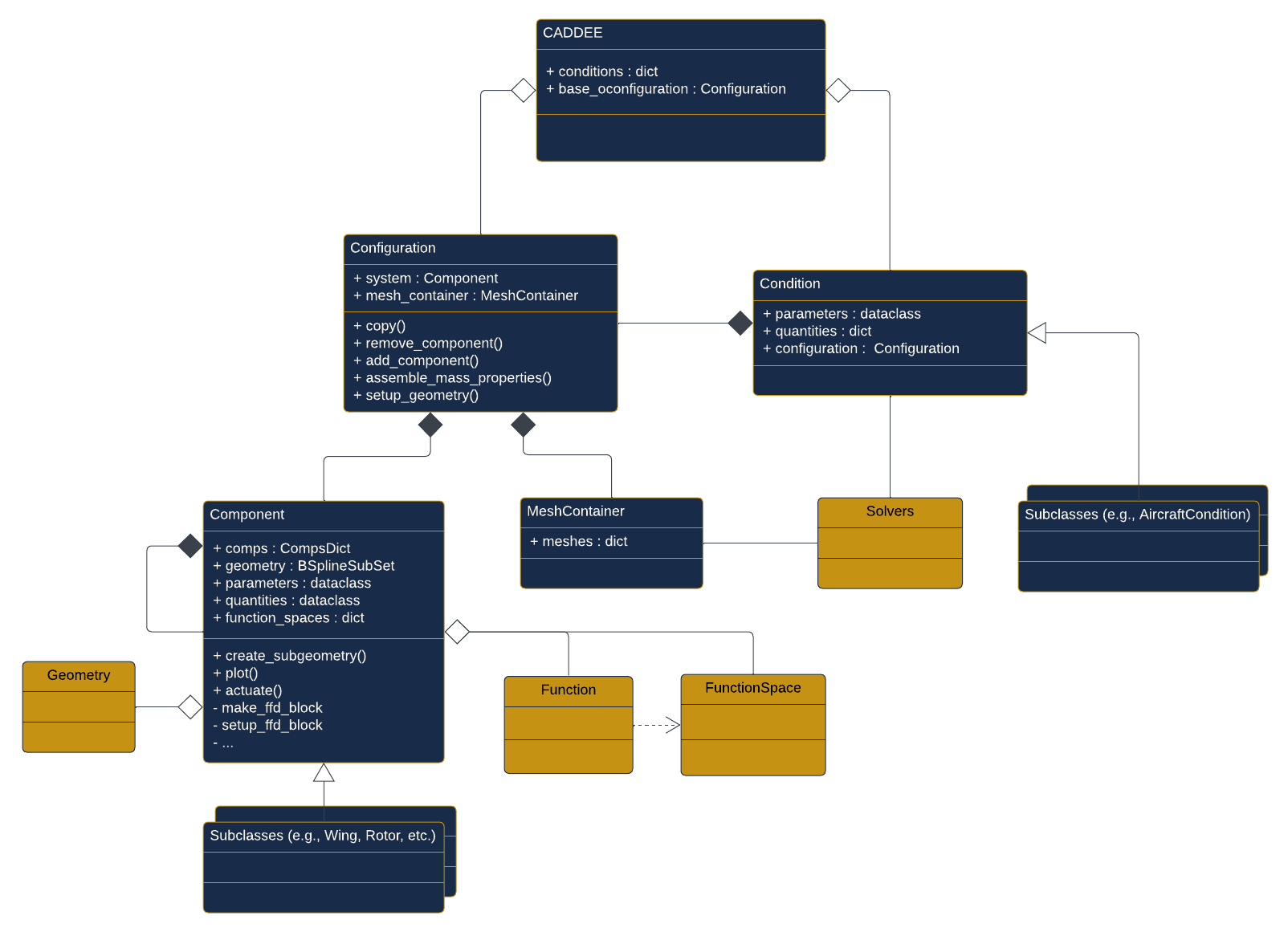
In this section, we first go over some key terms and definitions that are helpful to know when using CADDEE. Next, we briefly discuss CADDEE’s design philosophy and introduce the key (native) classes that a user will interacts with. This includes a briew description of the main classes as well as a UML class diagram that shows the relationship between classes.
Terms and definitions
System: A machine that manages power to perform tasks that involve motion and forces (Ex: aircraft, car, wind turbine, robot)
Component: A subset of the system without which it cannot perform its intended task (Ex: wing, engine, blade, actuator)
Geometry: A spatial representation of a component, typically in the form of a mathematical function
Free-form deformation (FFD): A parameterization method for manipulating the geometry of one or multiple components that involves parametrically defining a complex geometry as a function of a simple geometry such as a block.
Configuration: A variation of the system with a set of discrete or continuous changes to one or more of its components compared to the base configuration (Ex: aircraft with deflected control surface, retracted landing gear, removed/added winglets or even entire wing, different number of engines or batteries, etc.)
(Design) condition: A description of a mode of operation for the system, usually defined by rigid-body states. (Ex: cruise condition)
On-design condition: A description of an intended mode of operation of the system (Ex: cruise condition)
Off-design condition: A description of an un-intended mode of operation of the system (Ex: one-engine inoperative (OEI), structural sizing conditions like +3g pull-up maneuver)
Mesh
Solver: A computer program that implements a computational model (Ex: VAST, ADFlow, FlowUnsteady, lsdo_rotor, CCBlade)
Computational model: A set of explicit computations resulting from applying numerical solvers, like linear/non-linear solvers, to numerical models
Numerical model: A set of algebraic equations resulting from the discretization of differential or integral operators found in a mthematical model
Mathematical model: A set of equations (that may include differential or integral operators) whose solution describes the predicted behavior or performance of a system (Ex: steady RANS equations)
CADDEE design philosphy and classes
Design philosophy
CADDEE is implemented in Python and subscribes to the object-oriented programming (OOP) paradigm, which allows a user to operate at a high level of abstraction. This is particularly convenient when constructing complex computational models where a user is only interested in high-level outputs and inputs and how they are used to connect solvers. Solvers that are integrated through CADDEE are written in the Computational System Design Language (CSDL), a python-based language for multidisciplinary design optimization (MDO) whose critical feature is automated sensitivity analysis for gradient-based optimization. Unlike CADDEE, CSDL subsribes to the functional programming (FP) paradigm, which allows the developers of solvers to precisely and unambiguously define the mathemtical operations that make up the computational model that the solver implements. For assembling large computatational models, a user will treat solvers like a black box that performs analyses and outputs certain quantities of interest that CADDEE will organize and proecess.
The design philosophy of CADDEE is centered around simplicity, flexibility, and extensibility.
Simplicity: CADDEE is a light-weight package that aims to enable the construction of complex computational models through few, well-designed classes
Flexibility: CADDEE is amenable to various combinations of design conditions, configurations and components. As such, changes to the system can be defined through different configurations and analyzed across different conditions. For example, variations of certain types of air taxi concepts can be easily constructed by adding or removing rotors, batteries or other components and analyzing these configurations in different design conditions, like a fast or slow cruise.
Extensibility: While conceived with aircraft design in mind, CADDEE is designed extend to other disciplines like wind-turbines or robotics.
The following desscription of CADDEE’s classes aims to illustrate some of the aspects of its design philosophy.
General description of classes
There are four main classes native to the CADDEE framework:
CADDEEConditionConfigurationComponent.
At the top level, the CADDEE class acts as container of two objects, the base_configuration (instance of Configuration) and a conditions dictionary. The conditions dictionary stores instances of the second major class, Condition. Conditions serve as a way to compartmentalize the analysis (done through discipline solvers) of the engineering system. Subclasses of Condition, like AircraftCondition narrow the scope of the analysis to a specific application domain (i.e., aircraft design) and have sepcific condition parameters, like mach_number, altitude, or flight_path_angle. These parameters are passed into the constructor upon instantiation of the condition class and are stored in a designated parameters attribute. An example of how conditions are instantiated is shown in the code snippet below for an CruiseCondition subclass (AircraftCondition), for which there are additional attributes (ac_states and atmos_states) that are computed automatically upon instantiation.
CruiseCondition subclass 1cruise = CruiseCondition(
2 mach_number=0.2,
3 altitude=3e3,
4 pitch_angle=np.deg2rad(0.5),
5 range=5e5,
6)
7
8print("Cruise parameters: ", cruise.parameters)
9print("Cruise aircraft states: ", cruise.ac_states)
10print("Cruise atmospheric states: ", cruise.atmos_states)
This yields the following output:
Cruise parameters:          CruiseParameters(altitude=3000.0, speed=65.71075650150438, mach_number=0.2, pitch_angle=0.008726646259971648, range=500000.0, time=7609.104302254579)
Cruise aircraft states:     AircaftStates(u=65.70825443724581, v=0, w=0.5734272492353838, p=0, q=0, r=0, phi=0, theta=0.008726646259971648, psi=0, x=0, y=0, z=3000.0)
Cruise atmospheric states:  AtmosphericStates(density=0.9090914475604668, speed_of_sound=328.5537825075219, temperature=268.66, pressure=70095.87788255778, dynamic_viscosity=1.6422497463297507e-05)
Lastly, the base Condition class has two additional attributes: quantities, which is a dictionary used to store certain (user-specified) quantities of interest (i.e., quantities that are not parameters) and configuration, which is an instance of the Configuration class. Typically, a condition contains axactly one configuration, which is a different instance than the base configuration of the CADDEE class. Examples and tutorials will go into more details about how to use the Condition class.
The Configuration class is the third major class in CADDEE. It has two attributes: system and mesh_container, where the former is an instance of the Component class and the latter is an instance of a MeshContainer dictionary, used for storing solver meshes. The system is the top-level parent component that can contain one or more children components, which in turn may contain their own children components, creating a component hierarchy. The key functionalities of the Configuration class can be summarized by its class methods:
copy(): uses the component hierarchy to create copies of thesystemcomponent and its children components. This is necessary to make changes to the system that are confined to a certain design condition, for example to actuate an aileron, elevator, or a tilt-rotor. Such changes are specific to one design condition and should not affect the system in other design conditions. Thecopy()method addresses this need.add_component()+remove_component(): adds or removes components from the configuration. Again, this will not affect other configuration. There are several scenarios where these methods will be useful. For example, a user may want to compare variations of the same aircraft concept like an air taxi concept with varying number of rotors or an airliner with and without wing tips. Another example is jettisoning a pyload or multi-stage rockets, where the baseline configuration changes significantly.assemble_mass_properties(): traverses the component hierarchy and sums up the component-level mass properties (if specified), consisting of mass, center of gravity vector, and the moment of inertia tensor (computed using parallel axis theorem).setup_geometry(): sets up the free-form deformation geometry solver, which will manipulate the central geometry (if provided) to achieve the user specified design changes.
More details of these methods can be found in the examples.
The Component class is the last major class in CADDEE, wich forms the building block for creating a system and has several key attributes a user may interact with:
parameters: Similar to theConditionclass, a user passes the component parameters into the constructor when instantiating aComponent, which can be accessed through theparametersdataclass attribute. CADDEE comes with several stock components with pre-defined parameters but it is possible to define a custom component with key word arguments, using the**kwargssyntax.quantities: Again, like in theConditionclass, components have aquantitiesattribute, which is a dataclass for storing quantities of interest that are not parameters. Examples could be the thrust a rotor produces, or the lift generated by a wing. Thequantitiesdataclass comes with one pre-defined entry:mass_properties, which in turn is a dataclass for storing the mass, center of gravity, and the moment of inertia tensor of a component.geometry(default isNone): A component’s geometry is typically an instance of aBSplineSubSet, which describes a b-spline surface stored in a .stp file. While CADDEE is most powerful when used in combination with its embedded geometry engine, it is possible to define components without specifiying a geometry. This can be particularly useful when dealing with low-level components for which it may be unncessary to define a geometry, e.g., an inverter or DC bus.comps: a generic dictionary storing a component’s children components. Thecompsdictionary is used to establish the component hierarchy of a system.function_spaces: a generic dictionary for storing one or more light-weight non-nativeFunctionSpaceclasses. Function spaces are used in CADDEE to create functions for representing field data. An example of this is the representation of a pressure field over a wing or the induced velocity over a rotor disk. Representing such field quantities using functions can be convenient when interpolating and visualizing solver outputs.
Lastly, the Component class has several methods a user might interact with.
create_subgeometry(): returns an instance ofBSplineSubSetthat describes the geometry of a (child) component. The intended usage of this method is to use a parent component to define/create the geometry of its children components.plot(): plots a component’s geometry (if it has been provided)actuate(): actuates a component’s geometry, which is typically a rotation. An example of this is the rotation of an elevator or a tilting rotor. Note that the baseComponentclass will raise aNotImplementedErrorwhen calling this method as it meant for specific sub-components. A user may easily define their own component subclass and implement theactuatemethod.
Below is a quick example of how to build a component hierarchy for a Cessna C172, which will be explained in more detail in the exmples section.
Component hierarchy 1# Make aircraft component and assign airframe
2c172 = Aircraft()
3c172.comps["airframe"] = airframe = Component()
4
5# Geometric parameters
6# Wing
7S_ref_wing = 174 # sq ft
8S_wet_wing = 2.05 * S_ref_wing # sq ft
9wing_AR = 7.34
10wing_taper_ratio = 0.75
11wing_thickness_to_chord = 0.12
12
13main_wing = Wing(
14 AR=wing_AR,
15 S_ref=S_ref_wing,
16 S_wet=S_wet_wing,
17 sweep=0.,
18 taper_ratio=wing_taper_ratio,
19 thickness_to_chord_ratio=wing_thickness_to_chord,
20)
21airframe.comps["wing"] = main_wing
22
23# horizontal tail
24S_ref_h_tail = 21.56 # sq ft
25span_h_tail = 11.12 # ft
26tail_thickness_to_chord = 0.12
27
28h_tail = Wing(
29 AR=None,
30 S_ref=S_ref_h_tail,
31 span=span_h_tail,
32 taper_ratio=0.75,
33 sweep=0.,
34 thickness_to_chord_ratio=tail_thickness_to_chord,
35)
36airframe.comps["h_tail"] = h_tail
37
38
39# vertical tail
40S_ref_v_tail = 11.2 # sq ft
41v_tail_AR = 2.
42v_tail_sweep = np.deg2rad(15)
43
44v_tail = Wing(
45 AR=v_tail_AR,
46 S_ref=S_ref_v_tail,
47 sweep=v_tail_sweep,
48)
49airframe.comps["v_tail"] = v_tail
50
51# fuselage
52fuselage_length = 28 # ft
53cabin_depth = 10 # ft
54max_width = 3.2 # ft
55S_wet_fuselage = 310 # sq ft
56
57fuselage = Fuselage(
58 length=fuselage_length,
59 max_width=max_width,
60 max_height=4.5,
61 cabin_depth=10.,
62 S_wet=S_wet_fuselage,
63)
64airframe.comps["fuselage"] = fuselage
65
66# Components without pre-specified parameters
67# Main landing gear
68main_landing_gear = Component()
69airframe.comps["main_landing_gear"] = main_landing_gear
70
71# Avionics
72avionics = Component()
73fuselage.comps["avionics"] = avionics
74
75# Instruments
76instruments = Component()
77fuselage.comps["instruments"] = instruments
78
79# Engine
80engine = Component()
81c172.comps["engine"] = engine
82
83# Fuel
84fuel = Component()
85main_wing.comps["fuel"] = fuel
86
87payload = Component()
88fuselage.comps["payload"] = payload
89
90# set the base configuration
91c172_base_config = Configuration(c172)
92caddee.base_configuration = c172_base_config
UML class diagram
The unified modeling language is the standard visual modeling language for system and software engineering, intended for constructing, visualizing, and documenting the design of (software) systems. It provids a standard set of diagrams and symbols for communicating the design and architecutre of a software framework. The following fiugre provides a brief overiew of some of the basic UML symbols that we use in the class diagram below. Inheritance relationship are shown primarily as examples of domain-specific sub-classes (aircraft-design in this cases) and are not exhausitve.

These UML symbols have the following meaning
Association: A relationship between two or more classes. It indicates that objects of one class are connected or interact with objects of another class. Associations can be binary (between two classes), or they can involve more than two classes.
Composition: A strong form of association that represents a whole-part relationship, indicating that the parts (contained objects) cannot exist independently of the whole (container object).
Aggregation: A weaker form of association where the contained objects can exist independently of the container object. It represents a “has-a” relationship, indicating that the contained objects can belong to one or multiple container objects or exist on their own.
Dependency: A directed relationship where a UML element depends on or requires another element to be specified or implemented.
Inheritance: A parent-child relationship where the child inherits the attributes and mathods from the parent.
In addition, the symbols + and - are used to denote public and private class attributes and methods, respectively. The CADDEE class diagram is shown below, where the navy-blue color indicates classes that are natively in CADDEE while the gold color indicates classes that imported into CADDEE.